User Guide
How to play. Everything happens on a single page — the table is rendered by index.php and
updates itself automatically.
Register & log in
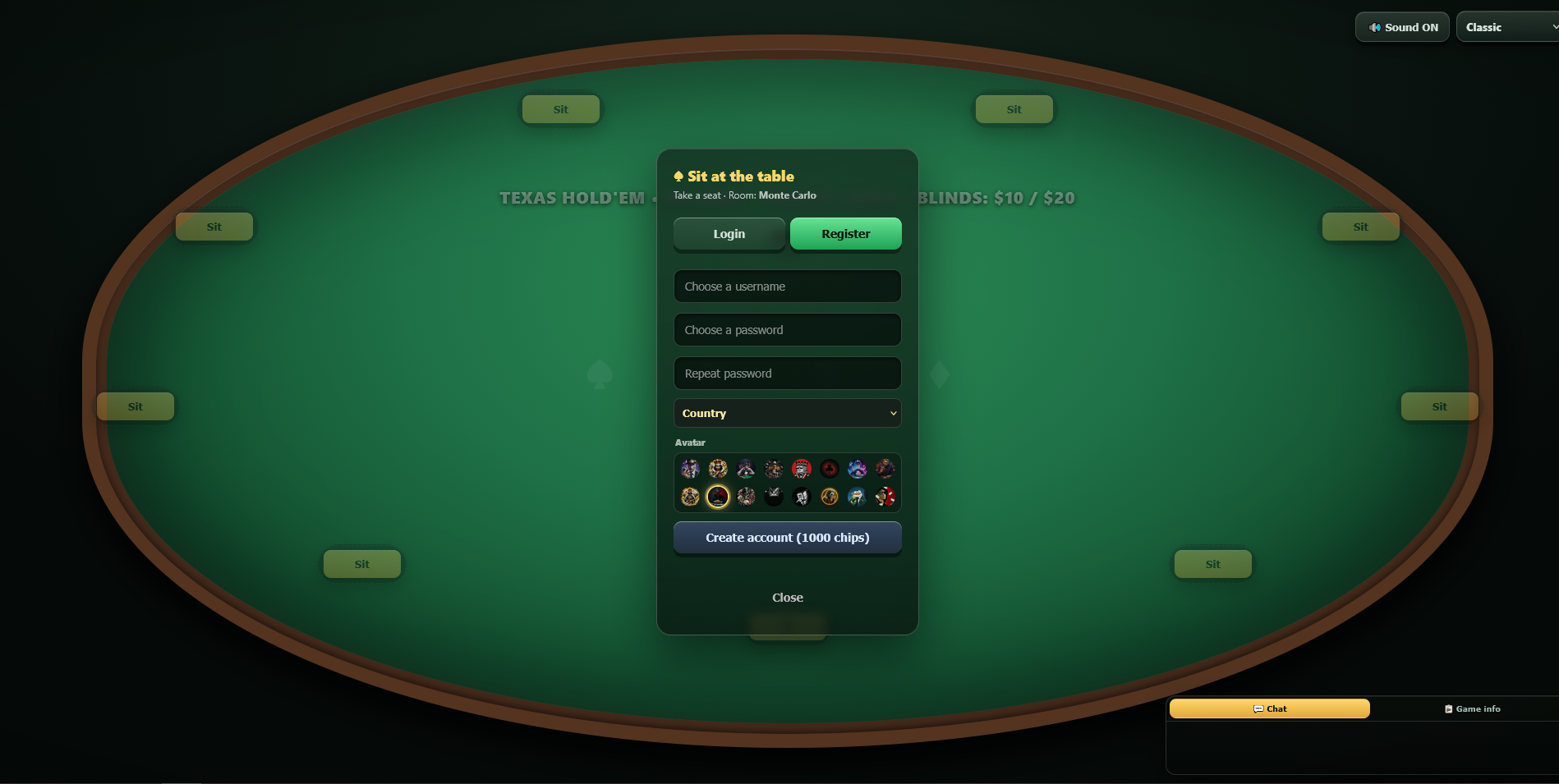
- Click an empty seat or the Sit prompt to open the auth dialog.
- Use the Register tab: choose a username (3–16 chars), password, country and avatar.
- New accounts start with the configured starting stack (default 1000 chips).
- Returning players use the Login tab. Use the Logout button (top bar) when done.
Sitting at a table
- Sit: pick an empty seat; you are dealt in at the next hand.
- Stand: leave the table. If you are in a hand, you fold and are removed when it ends.
Sit out, away, and removal
- Sit out / Away: you stay seated but skip hands. A countdown (10:00) appears on your seat.
- Back: choose to post the big blind immediately, or wait for the BB to reach you (no dead blind in the second case).
- If you stay away for the full 10 minutes, you are removed from the table and your stack is saved to your account — you can sit again at any time.
- Leave table: confirmation modal, then you become a spectator.
Changing the blinds
Any seated player can change the table blinds by clicking the ⚙️ Blinds button in the top bar (visible only when logged in). The new blinds apply to new hands only — the current hand finishes with the old blinds. The change affects all players at that table.
The admin can take this away with POKER_BLINDS_BY_PLAYERS = false: the button then
disappears, and a stale page that still shows it gets Changing the blinds is disabled. The
admin observer can always change the blinds. See Admin & Settings.
The felt adapts to the number of players
The seats are not tied to fixed table positions: the players who are actually seated share
the ring evenly, so two players sit opposite each other, three form a triangle, four a diamond,
and so on. Your own seat is always the bottom centre and the order runs clockwise. The chip
piles, the $ amounts and the D / SB / BB discs are all derived from the seat
position, so they follow the same layout automatically. A Sit button is never drawn on
top of a player: when the table is nearly full the players keep the classic nine slots, which
looks like a live table with one empty chair.
Adding bots (for local testing)
Registered players can click 🤖 Add bot to seat a bot opponent in an empty seat.
Bots use preflop GTO ranges and Monte Carlo equity, so a table is never empty.
Two switches decide whether that button exists: POKER_BOTS_ALLOWED (bots may sit at
the table at all) and POKER_BOTS_ADD_BY_PLAYERS (players, not just the admin, may
seat them). Both are true by default; see
Configuration or the Bots tab of
Admin & Settings.
Bot personalities
Every bot draws a personality when it sits down, from its own id, and keeps it until it leaves the table. Nobody chooses it for them and it is not shown on the felt — you read it from how they play.
| Style | How it plays | How to handle it |
|---|---|---|
| TAG 40% |
Balanced and aggressive: enters with good hands and raises when it does. | The solid default; the hardest to exploit. |
| Rock 25% |
Tight and passive: fewer hands, smaller opens, folds more often. | A Rock raising usually has a real hand — steal its blinds instead. |
| LAG 25% |
Loose and aggressive: more hands, more raises and more bluffs. | Wait for a real hand and let it bet into you. |
| Station 10% |
Loose and passive: plays too many hands and mostly calls. | Never bluff it; bet only for value. |
The difference is measurable: first-in raises come at about 18% for a Rock, 24% for a TAG and 34% for a LAG, while a Station calls a single open roughly three times as often as a TAG.
Thinking time follows the style: a LAG answers quickly, a Rock or a Station takes longer, any bot waits a little more when the decision is close to the price (call or fold at the pot odds) and snaps when there is nothing to decide (a free check). Everything stays under 4.5 seconds, and around four bots in ten also buy a bigger Monte-Carlo sample on borderline spots. At a two-player table every bot widens up and attacks more, as heads-up poker requires.
One switch turns all of it off: POKER_BOT_STYLES_ENABLED in
Configuration (or the Bots tab of
Admin & Settings). With it off every bot plays the identical baseline engine
again — same ranges, same sizing, same fixed 1.5–2.8 s wait.
Removing bots
To remove a bot from the table, click on its seat. A confirmation modal appears; confirm and the bot leaves when the current hand ends (it folds immediately, then its seat is freed).
Multiple rooms
Each room has its own chat, hand history, and table state. To join a specific room, open index.php#RoomName in your browser.
- Room names: 2–20 characters, letters/digits/underscore/dash.
- The default room is set in
config.php(POKER_DEFAULT_ROOM, default "MonteCarlo"). - Example:
https://your-site.com/index.php#LasVegas - Only the default room plus the codes listed in
POKER_ROOMSare playable. Any other name in the URL simply opens the default table — no new table is created and nothing is written to disk. - When the admin removes a room it closes gracefully: the hand in progress is finished, the stacks are settled and the table is then refused with a message. Adding the code back reopens it with the same stacks.
Watching as a spectator
If you don't log in, you can still open index.php and watch the table. Spectators see the same table, chat, and animations — but cannot sit, add bots, change blinds, or write in chat. You can pick a theme from the top bar; the choice is stored in a first-party cookie so it survives a reload.
Disconnect, timeouts, and auto-rebuy
- Disconnect mid-hand: you are auto-folded (unless already all-in — then the hand finishes for you and you may win the pot).
- 3 missed turns in a row: you are automatically switched to Sit out (Away).
- Return within 2 minutes: you are still seated and play resumes.
- Automatic rebuy: when your stack reaches 0, you receive the starting stack (default 1000 chips) on your next hand — free.
All-in showdown
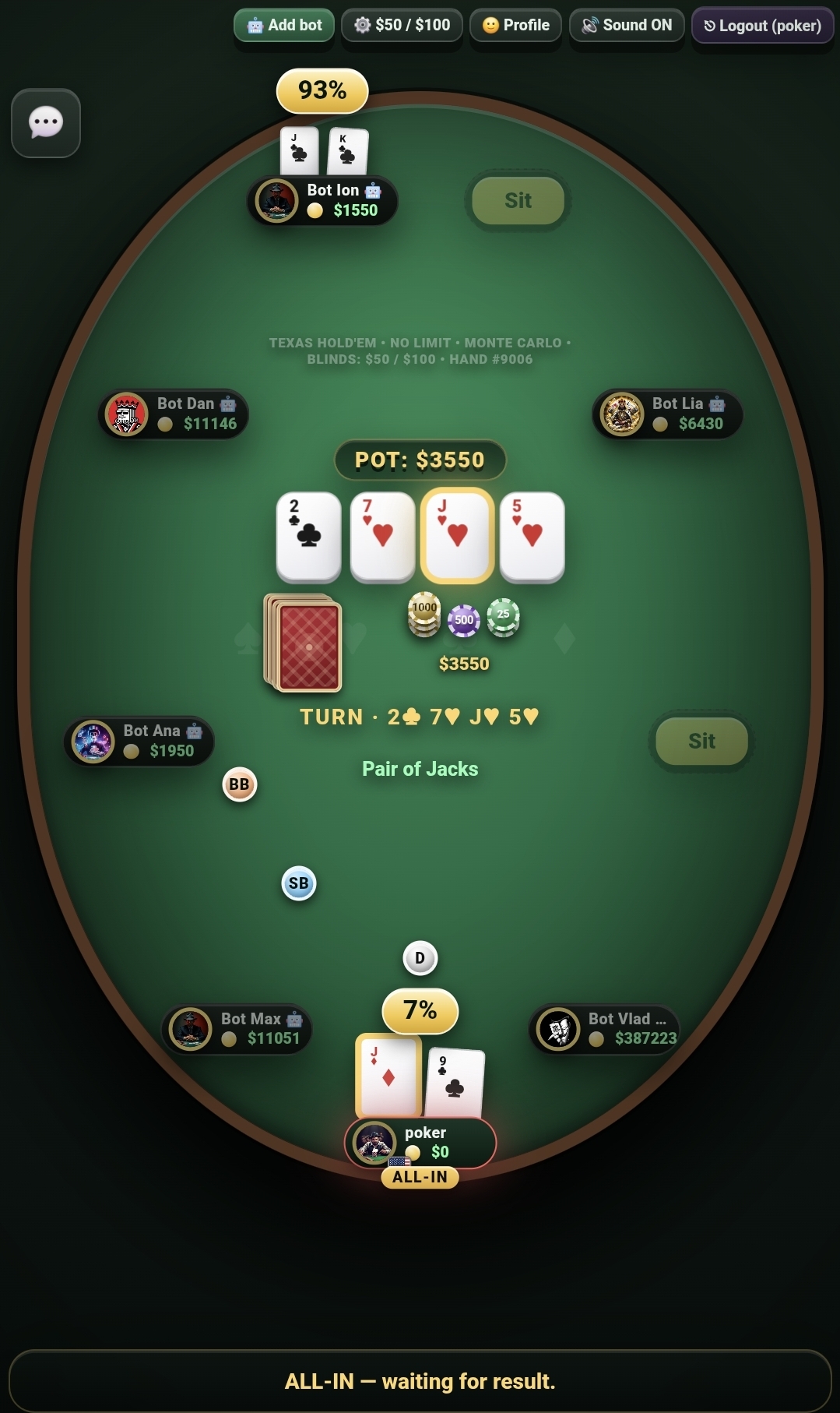
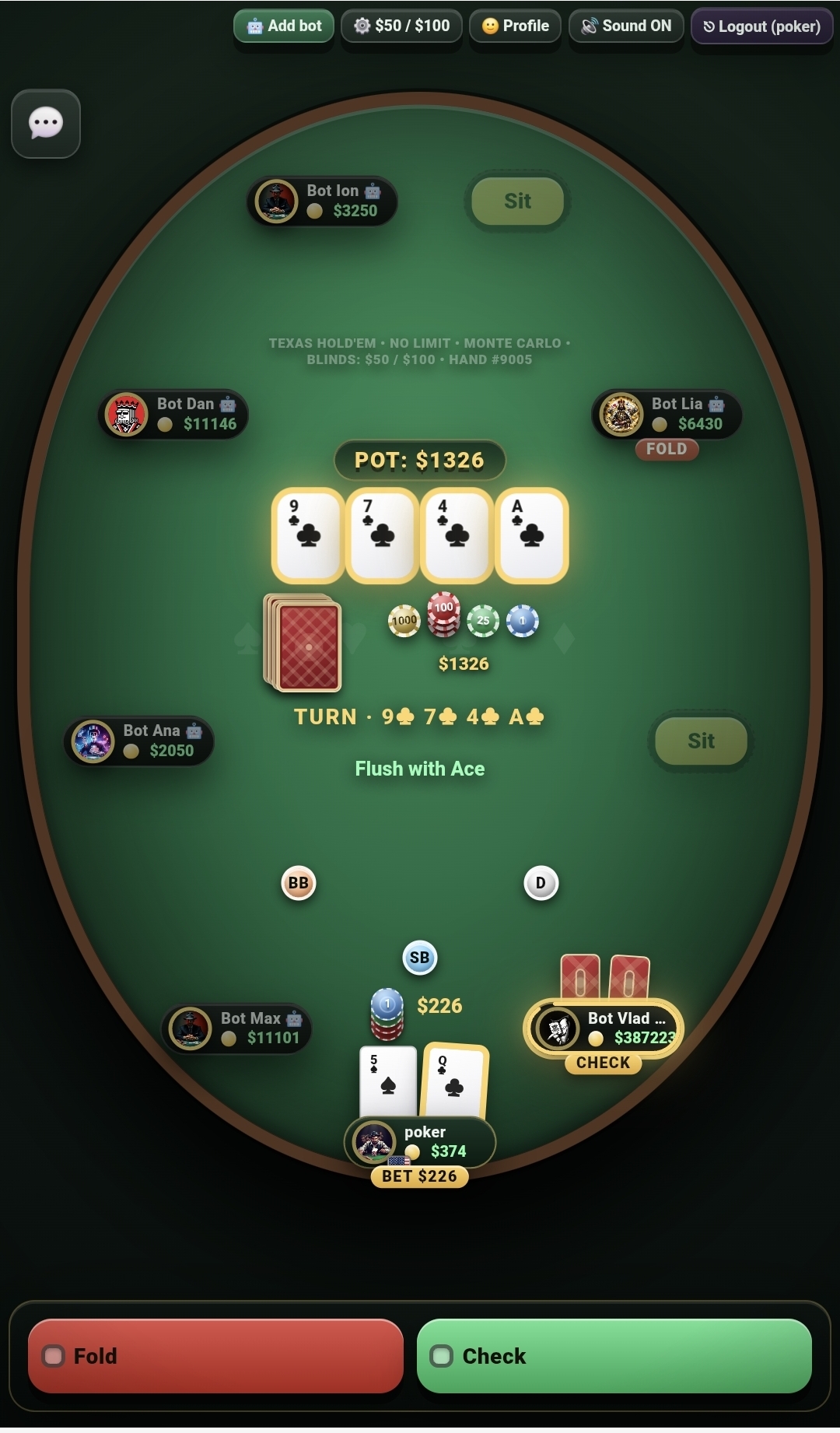
When two or more players are all-in, all hole cards are revealed and a live win probability % is displayed above each seat. The board cards are dealt one by one with a short pause between streets. Under the pot you see the name of your current best hand (e.g. "Pair of Sevens") updated on every street.
At showdown the winning hand is named the way a live room does it — with the cards that broke the tie, called the kickers: Pair of Sevens, Ace kicker, Ace high, King kicker, Two pair, Kings and Sevens, Ace kicker. A kicker can be any rank (also a small card: Pair of Twos, Five kicker). Flush, straight, full house and straight flush keep their classic names, because there the whole five cards decide the hand. The same wording is used on the felt, in the game log and in the hand replay.
When somebody goes all-in for less than the others bet, the centre of the table shows the pots separately: a MAIN stack with its amount and, next to it, one or more SIDE stacks — each with its own chips and its own total. The main pot is the one every player in the hand paid into (limited by the shortest all-in); the side pots hold the rest and only the players who covered them can win them. A plain bet/raise difference (nobody all-in) is not a side pot: it stays one single stack. The result line lists the winners with their amounts, e.g. 🏆 Bot Radu wins $1803 · poker wins $31986.
While an all-in run-out is in progress the betting is closed, so no action buttons are shown — the action bar only says ⏳ ALL-IN — running out the board…. If you are all-in yourself it says ALL-IN — waiting for result., and a player with no chips left simply cannot act (the server rejects it with “You are all-in”). Only the players who still have chips and are not all-in keep their FOLD / CHECK / CALL / RAISE buttons.
Rabbit Hunt (fold-out reveal)
When a hand ends early because everybody folded and only one player is left, the table shows the cards that would have come next — the classic "rabbit hunt" from real card rooms. The cards fly out of the deck on the table, flip over one by one and stay visible for about 3.5 seconds before they fade out. It is a visual extra only: the pot is already awarded and the result never changes.
| Hand ended on | Cards revealed |
|---|---|
| Preflop (everybody folded before the flop) | 5 — the would-be flop, turn and river |
| Flop | 2 — the would-be turn and river |
| Turn | 1 — the would-be river |
| River | Nothing — there are no cards left to come |
- The reveal is public: the winner, the other players and spectators all see the same cards.
- The cards always continue the board line on the table, and the deck stays visible while they fly out of it.
- There is no reveal at showdown (the hands are shown instead) and none for an all-in run-out, where the engine deals the real board.
- The same
🐇 Rabbit Hunt: …line is written in the game log, and the hand's replay shows the cards too: from the step where they were revealed they stay on the board line, right after the real board cards (a bit smaller, behind a dashed separator and marked with a 🐇). - A short “pop” is played as each card is revealed (it follows your own
🔊 Sound ON/OFF button and can be switched off for everybody with
POKER_RABBIT_SOUND). - Duration and availability are set in
config.php:POKER_RABBIT_MS(default3500) andPOKER_RABBIT_ENABLED(defaulttrue) — see Configuration.
Hand strength meter
Under your hand name on the felt (below the board) there is a thin hand-strength bar:
a live 0–100% reading of how strong your current hand is against the players still in the pot.
It is calculated in the browser (Monte Carlo against random hands, cached until something
changes), fills red below 35%, green above 65%, and hides itself when you are not in the hand,
after you fold, between hands and during an all-in showdown — there the win-% badges above the
seats take over. Turn the whole feature off with POKER_HAND_METER_ENABLED
(Configuration).
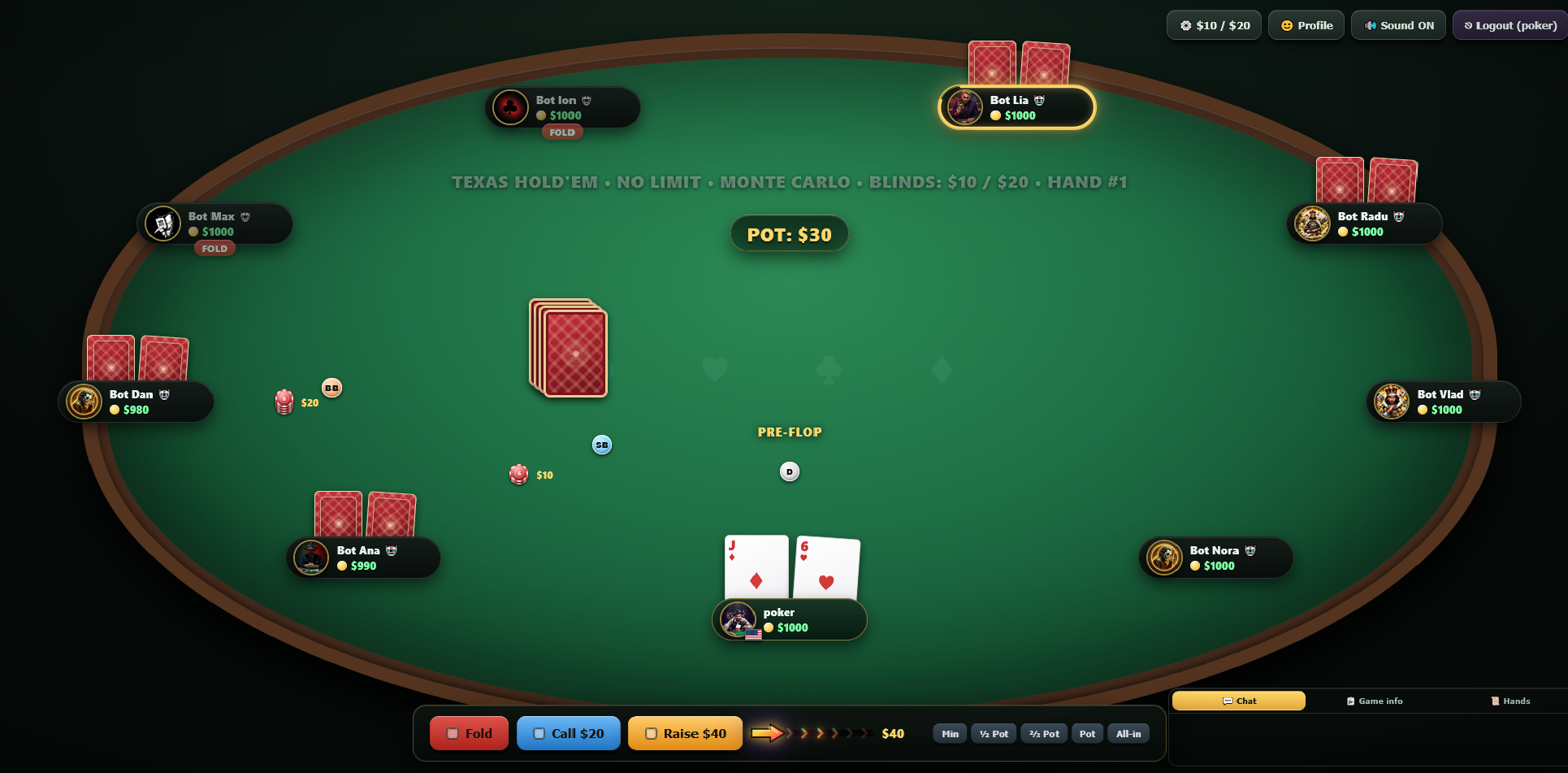
Playing a hand
- Fold — give up the hand.
- Check — pass when there is no bet to you.
- Call — match the current bet.
- Raise / Bet — increase the bet (the button label changes with the situation).
- Drag the slider to size your bet, or use the quick presets: Min ½ Pot ⅔ Pot Pot All-in.
Pre-actions
Before it is your turn you can queue an action so the game keeps flowing: Check/Fold or Call any. The pre-action is applied automatically when the action reaches you.
Fair deal & card randomness
The deck is created and shuffled on the server, in PHP, once per hand. The shuffle uses PHP's
cryptographic random number generator random_int() — the same class of generator Node.js
exposes as crypto.randomInt() — driven by a Fisher–Yates (Durstenfeld) loop:
function deck_new(): array {
  // the 52 cards, in a fixed order
}

function shuffle_arr(array &$a): void {
  for ($i = count($a) - 1; $i > 0; $i--) {
    $j = random_int(0, $i);          // CSPRNG, not rand()/mt_rand()
    if ($j !== $i) { $t = $a[$i]; $a[$i] = $a[$j]; $a[$j] = $t; }
  }
}- No
rand(), nomt_rand(), noshuffle()anywhere in the code base: those are fast but predictable once their internal state is known. random_int()takes its entropy from the operating system. There is no seed to guess and no sequence that can be computed from earlier hands, so the next shuffle cannot be predicted from the previous ones.- One fresh deck per hand, and each card is removed from it as it is dealt (hole cards round-robin, then flop, turn, river) — the same card can never appear twice in a hand.
- The deck never leaves the server: the state sent to the browser is stripped of the deck and of every hole card that is not yours.
How to verify it yourself
The distribution was measured with a standalone CLI script — a developer tool that is not shipped with the package — which copies the two functions above verbatim and shuffles a full deck 200,000 times. From your own copy, outside the web root:
php rng_test.php 200000- 0 invalid decks (52 unique cards, every time) and 0 duplicate-card hands over a simulated 9-handed deal.
- Chi-square uniformity tests: first card p = 0.79, position of the A♠ p = 0.15,
raw
random_int()output p = 0.27 — all far above the 0.01 threshold. - Mean position of each card ≈ 25.5 (the expected value for 52 cards); largest deviation |z| = 3.6, which is normal across 52 simultaneous tests.
- Throughput ≈ 20,000 shuffles per second (about 10.4 million
random_int()calls in under 10 s).
The production code contains no test hooks and no way to force a deck. Randomness is also not
configurable — it is always random_int(), see Configuration.
Chat & emoji
Seated players can talk in the Chat tab of the side panel (emoji button included). Messages are moderated by the banned-word list and rate-limited to prevent flooding.
Profile (avatar, country, theme)
Open the Profile dialog from the top bar to change your avatar, country flag and theme. The choice is stored in your account and applied on your next page load. Guests (spectators) can pick a theme from the top bar; it is kept in a first-party cookie.
Hand history & replay
Use the 📜 Hands tab to list your recent hands. Select one to replay it street by street, including showdown equity for all-in situations.
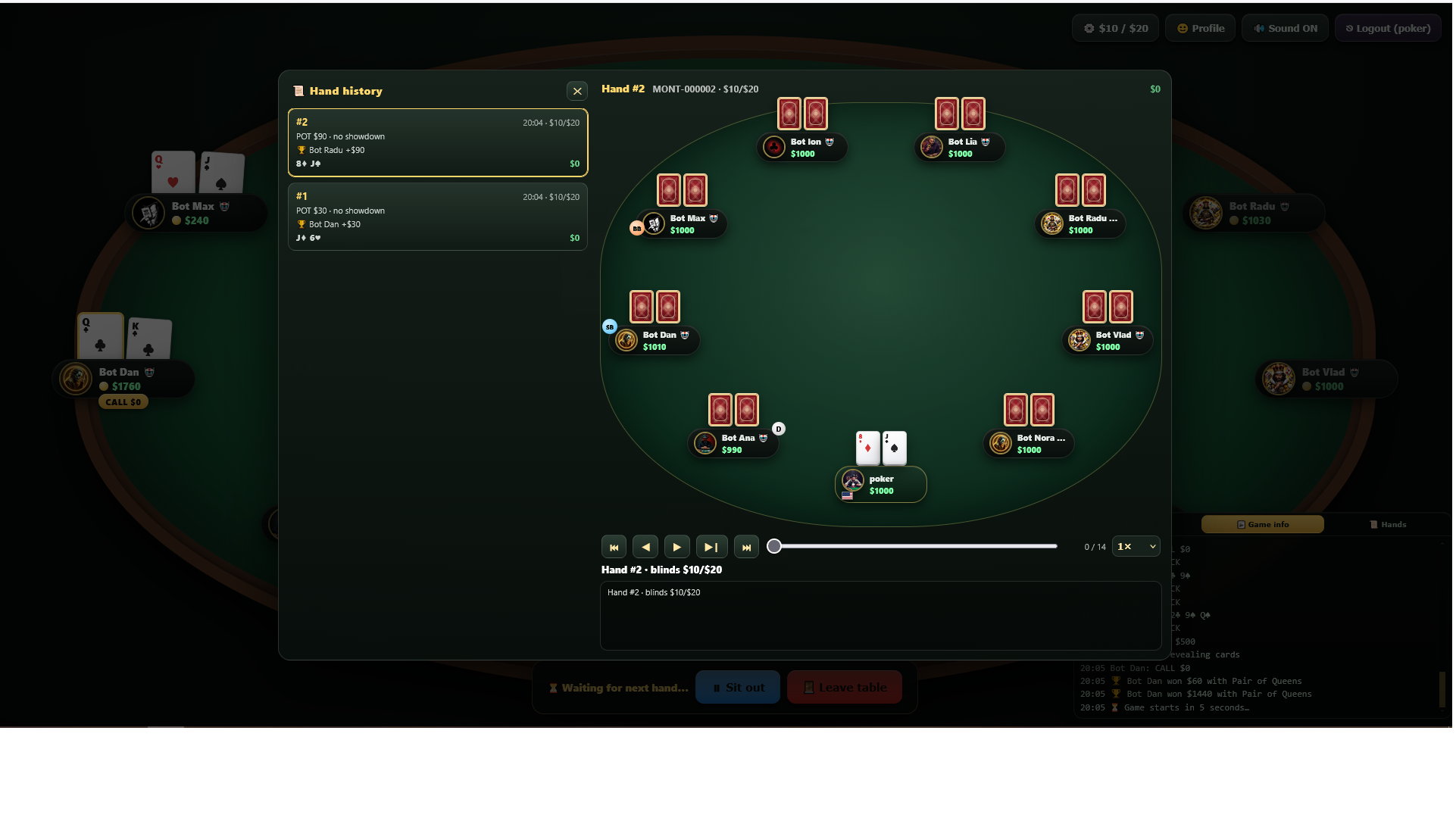
Table info (top-left)
In the top-left corner of the table a small badge shows how many players are seated
(👤 3 online) and — only while at least one bot is seated — how many of them are bots
(🤖 2 bots). It is public: the winner, the other players and spectators all see the same
numbers, and it updates on every hand. Switch the whole badge off with
POKER_TABLE_INFO_ENABLED in Configuration.
Mobile
The layout is responsive and a dedicated mobile stylesheet loads on small screens. The side panel (chat / game info) collapses, and the action buttons move to the bottom for thumb access.
Sound
Game sounds (cards, chips, fold/call/raise) play on first user interaction, as required by browsers. Mute the tab or the device to silence them.
Sounds
The top bar has a 🔊 Sound ON / 🔇 Sound OFF toggle. The choice is saved in your browser (localStorage) and survives reloads. All sounds play only after your first interaction with the page, as required by modern browsers.
Game log & hand list
The side panel on the right has three tabs:
- 💬 Chat — in-game chat between seated players, with emoji picker.
- 📋 Game info — a real-time play-by-play log of every action at the table.
- 📜 Hands — the last 50 hands you played, with a replay option.
On mobile, use the 💬 tab on the left side of the screen to open/close the panel.
Admin: observer, kick and bans
Open admin.php with the admin password (configured as a bcrypt hash in
$ADMIN_HASH at the top of the file; the password itself is never stored).
It renders the real table — same cards, chips, dealer button and animations — with
every player's hole cards visible. The top bar links to ⚙️ Settings
(?cfg=1, the config editor — documented in
Admin & Settings) and back to the game.
Players panel
On the right side of the observer page, the Players panel lists the human players at the current room, each with their IP and stack. Bots are not listed there — in the observer, click a bot's seat on the table and confirm, exactly as a seated player does. If no hand is running the bot leaves immediately; if a hand is running it plays that hand to the end and its seat is freed the moment the hand is over, without being dealt into the next one. The player list refreshes when the page opens, on ⟳, and every 15 seconds.
- Kick asks for confirmation and accepts an optional message. The seat is freed immediately (or the player folds now and the seat is freed when the hand ends) and re-seating in that room is blocked for 5 minutes. The message is shown to the player if they try to sit again.
- Ban opens a duration card: 10 min, 1 h, 24 h, 7 days, or any
number of minutes typed in the box, where
0means permanent. An optional reason can be attached. A ban blocks both the account and the current IP: login and seating are refused, and the player is removed from every table.
Bans list
Below the player list, the Bans section shows the active bans, newest first, limited to the
10 most recent — the header reads latest 10 when more exist. Each row is one ban:
username · IP, the date and time it was issued, and a live countdown
(2d 04h 22m 07s; permanent bans read permanently).
- The search box filters instantly by username or IP, across all bans and ignoring the
10-item limit (
3 of 14in the header). - Unban asks for confirmation, shows the reason that was recorded, and lifts the account ban, its re-sit block and the IP ban created with it in a single click.
- An IP entry without an account (older files or a hand-edited
bans.json) is listed separately asip …, with its own Unban.
What a banned player sees
The table stays loaded, but every request is refused server-side and the server's message — the
remaining time and the reason — is shown large in the middle of the screen, for example
Banned for 9m 58s on one line and Reason: abusive chat on the next.
Closing the page, reloading or registering another account from the same address does not help
while the IP is banned. When the timer reaches zero the ban expires and the table starts
responding again, with no reload needed.
Bans and kick deadlines are kept in data/bans.json — no database.
Note that an IP ban also covers everyone sharing that address (home, office, mobile carrier),
and that changing IP bypasses the IP part while the username ban stays in force.